1. Home
  2. Uncensored AI image generator
Dark art, welcome

Uncensored AI image generator for the art other tools won't make

Unrestricted AI is an uncensored AI image generator for the dark, horror, gritty and surreal images that mainstream generators often block, made from a plain text prompt in your browser. It still refuses a short list of hard lines: anything involving minors, and sexual or fake images of real people.

Adults 18+No ads, everCancel in one click
Updated October 19, 20266 min readBy the Unrestricted AI team
Unrestricted AIMax model
Prompts that get blocked elsewhere

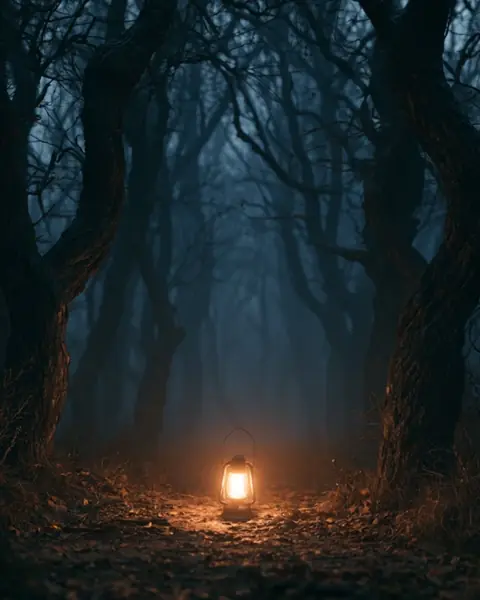
A scary forest at night, something watching from the trees, one lantern. Make it genuinely frightening.

Unrestricted AI
Horror forest at night, a lone lantern hanging from a dead branch, twisted black trees, thick fog, pale eyes glowing between the trunks, cold blue moonlight, film grain, dread, cinematic wide shotGenerating · 1024×1280

“Horror forest at night, a lone lantern hanging from a dead branch, twisted black trees, thick fog, pale eyes glowing between the trunks, cold blue moonlight, film grain, dread, cinematic wide shot”

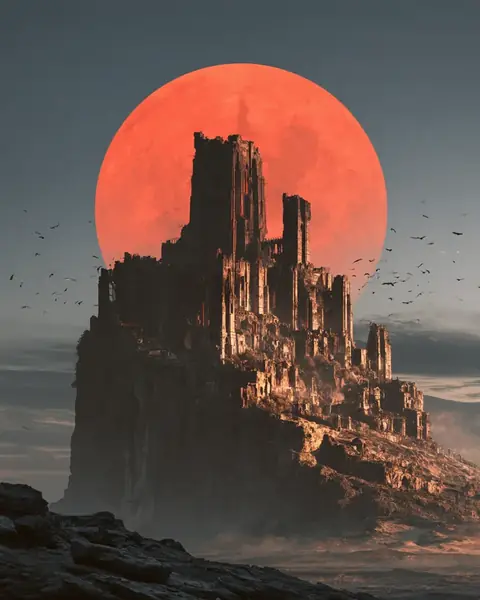
Now a ruined gothic cathedral under a blood-red moon. Apocalyptic, no hope.

Unrestricted AI
Ruined gothic cathedral under a huge blood-red moon, collapsed vaulted roof, shattered stained glass, crows circling, ash falling like snow, dark fantasy matte painting, ominous red rim lightGenerating · 1024×1280

“Ruined gothic cathedral under a huge blood-red moon, collapsed vaulted roof, shattered stained glass, crows circling, ash falling like snow, dark fantasy matte painting, ominous red rim light”

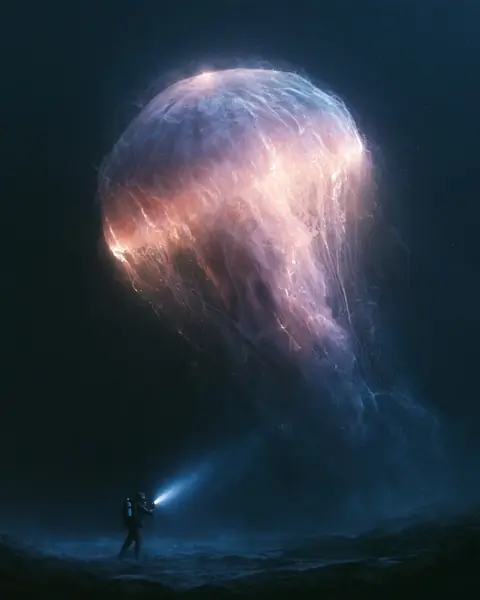
Last one: a deep-sea monster in total darkness, the kind of thing that ends a submarine.

Unrestricted AI
Colossal deep-sea creature emerging from pitch-black abyss, bioluminescent lures, rows of needle teeth, tiny submarine searchlight for scale, crushing depth, murky particles, cosmic horror, photorealisticGenerating · 1024×1280

“Colossal deep-sea creature emerging from pitch-black abyss, bioluminescent lures, rows of needle teeth, tiny submarine searchlight for scale, crushing depth, murky particles, cosmic horror, photorealistic”

Ask anything…
Illustrative conversation

What our uncensored AI image generator is built for

In short

Most image generators are tuned for safe, bright, shareable pictures: cozy cafés, cute animals, product shots. Ask for something frightening, bloody or bleak and you'll often get a warning, a blurred result or a cheerful version of what you asked for. Our image tool is tuned for the opposite end of the spectrum, the moody and the macabre.

Dread, monsters, gore in fiction

Horror

Haunted places, creatures, body horror and the aftermath of something terrible, rendered as dark as your story needs.

Grim, not glossy

Dark fantasy

Fallen kingdoms, cursed knights, battlefields and gods with too many eyes. Think grimdark, not fairy tale.

War, crime, decay

Gritty realism

Rain-soaked crime scenes, ruined cities, soldiers in the mud. Realistic texture without a sanitizing filter.

Wrong on purpose

Surreal and unsettling

Impossible architecture, uncanny figures and dream logic that's meant to make viewers uncomfortable.

Shadows and sin

Noir and neo-noir

Smoke, neon, rain and bad decisions. Crime scenes and violence implied or shown.

Dystopia

Bleak sci-fi

Cyberpunk slums, failed colonies, cosmic horror. The future going badly.

It sits in the same app as our uncensored AI chat, so you can write a scene and illustrate it in the same conversation.

Why dark art gets blocked on mainstream AI image generators

It's not your imagination. Mainstream tools are designed to be safe for everyone, so their rules lean hard against anything disturbing. Midjourney's community guidelines (checked October 2026) say not to create gore, which they define to include blood and detached body parts, and to avoid content that is "visually shocking or disturbing". The same guidelines say some inputs are blocked automatically.

Filters also tend to react to words rather than intent. In a 2023 thread on the OpenAI developer forum, one user reported that a dark forest with a red-eyed bear was generated, while asking for a "scary forest with a scary bear" was blocked. Another thread from the same period complained that a horror-story vampire scene was refused. Horror artists run into this constantly.

We go deeper into keyword blocklists and output filters on our page about an AI image generator with no restrictions. The short version: if your style is dark, a general-audience tool will fight you.

AI image generator uncensored styles, with example prompts

StyleWhere mainstream tools often push backPrompt idea that works here
HorrorBlood, wounds, "scary" and "terrifying" as keywordsAbandoned hospital ward, flickering light, a shape under a bloodstained sheet
Dark fantasyBattle carnage, corpses, demonic imageryArmored knight kneeling in a field of fallen soldiers after the siege
War and crimeRealistic violence, weapons in use1940s detective standing over a chalk outline in the rain
Body horrorAnything "disturbing" or "grotesque"Porcelain doll slowly cracking open to reveal moving clockwork inside
Cosmic horrorShocking or unsettling scaleA city's skyline at dusk with an eye the size of a moon opening in the clouds

Illustrative. Mainstream filtering varies by tool, model and wording.

Try this prompt
Victorian surgeon's operating theater at midnight, gas lamps, rusted instruments on a tray, stained floorboards, empty seats in the gallery, oppressive shadows, oil painting, horror atmosphere
Try this prompt
Plague doctor walking through a burning medieval street, smoke and embers, bodies wrapped in cloth by the doorways, desaturated palette, cinematic, gritty

Prompt tips for uncensored AI image generation

Freedom doesn't fix a vague prompt. Dark images live or die on mood, light and texture, so spend your words there. A simple structure that works:

  1. Subject first. What's in frame, in concrete nouns: "a drowned bride", not "a creepy woman".
  2. Setting and time. Where and when: "flooded church crypt, dawn".
  3. Light. The single biggest mood lever. Try "one candle", "red rim light", "sodium streetlight", "no light except lightning".
  4. Mood words, sparingly. "Dread", "melancholy", "oppressive". Two or three, not ten.
  5. Medium and lens. "Oil painting", "35mm film grain", "wide shot", "macro". This decides whether it reads as art or photo.
  6. Texture. Rust, mold, wet stone, ash. Gritty images need tactile details.
Imply more than you show

The scariest images usually hide something. A shadow in a doorway or a smear on a wall often beats a full-frame monster. Ask for the moment before or after, not just the thing itself.

Prompt formula
[subject], [setting and time], [light source], [2-3 mood words], [medium and camera], [textures]

Writing the story behind the image? Our AI writer without restrictions handles the dark prose side, and you can ask it to turn a scene into an image prompt.

When the image isn't dark enough: quick fixes

Even without a filter in the way, models drift toward pretty. Bright colors, clean faces and centered compositions are the statistical default. When a result looks too polished, steer it back with specific changes instead of rewriting the whole prompt:

  • 01Too clean?Add wear: "cracked", "water-stained", "soot-covered", "peeling paint".
  • 02Too bright?Name one weak light source and say everything else is in shadow.
  • 03Too cartoonish?Ask for "35mm film photo" or "documentary photograph" instead of "illustration".
  • 04Too generic?Add one odd, specific detail, like a child's shoe on the stairs or a clock stopped at 3:14.
  • 05Too busy?Cut the prompt in half and keep only the subject, light and one texture.
  • 06Wrong colors?Give a palette: "desaturated greens and rust", "black, bone white and arterial red".
Try this follow-up
Same scene, but make it feel like a found photograph from 1978: faded colors, flash glare, slightly out of focus, something wrong in the background that you only notice second.

How the uncensored AI generator works in Unrestricted AI

  1. Sign in from your browser, on desktop or mobile. Nothing to install.
  2. Switch to the image tool, or simply ask for an image in the chat.
  3. Describe the scene. Use the structure above or just talk normally.
  4. Refine in plain words: "darker", "more fog", "make the creature bigger", "less gore, more dread".

Image generation is included in Max (€49.90/month): 200 images a month, plus our most permissive model and priority speed. Pro (€19.90/month) covers chat and web search but not images. There's no free plan or trial, and you can cancel in one click. See the pricing page for the full comparison.

Who an uncensored AI image generator is for

  • 01Horror and thriller writerswho want covers, mood boards or scene references that match the book.
  • 02Tabletop game mastersbuilding monsters, cursed locations and handouts for a grim campaign.
  • 03Indie game developerssketching concept art for dark settings before hiring an artist.
  • 04Musiciansin metal, darkwave or horrorcore looking for album-art directions.
  • 05Filmmakersstoryboarding violent or frightening scenes.

If you're comparing options, our honest roundup of the best uncensored AI image generators lists other tools, including free and local ones. If you have a strong graphics card and time to tinker, a local setup may suit you better; if you'd rather type a prompt and get a result, a hosted tool is simpler.

Uncensored doesn't mean NSFW

Search this topic and most results are about adult content. That's not what we built. The complaint that keeps showing up in creator forums is about images that are frightening, violent in a fictional way, morally ugly or just strange, and that's exactly the territory where general-audience generators are most restrictive. A battlefield after the fight, a monster mid-attack, a crime scene in the rain: those are the prompts that get stuck.

So the tool is tuned for atmosphere and darkness, not explicit material. If you want the bigger picture of what "uncensored" can honestly mean across chat and images, start with our explainer on uncensored AI.

What stays off-limits

"Uncensored" here means dark and adult-grade, not anything goes. The image tool refuses a short public list of hard lines, the same as the rest of the app:

  • Anything involving minors in sexual or harmful contexts.
  • Sexual images of real people, and fake images of real people, including celebrities and politicians.
  • Images meant to help someone hurt others, or anything that's illegal where you are.
Fiction, yes. Real people, no.

A fictional massacre in a fantasy war is fine. A realistic image of a named real person in that scene is not. The full list is on our acceptable use page. The service is for adults (18+).

FAQ

Questions, answered.

Straight answers to the questions people actually search for.

Still have a question?Ask Unrestricted AI directly. It answers without the lecture.Get accessRead the usage policy →
10 questions
01Is there an uncensored AI image generator?

Yes, with nuance. No legitimate service generates literally anything, but some are far more permissive than mainstream tools. Unrestricted AI handles horror, gore in fiction, dark fantasy and gritty realism that general-audience generators often block, while refusing a short list of hard lines like minors and fake images of real people.

02Can AI generate horror or gore images?

Mainstream generators usually restrict it. Midjourney's guidelines, for example, tell users not to create gore and to avoid visually shocking content. More permissive tools, including Unrestricted AI and open models you run locally, can produce horror and fictional violence. Results still depend on a well-written prompt focused on light, mood and texture.

03Why does my AI image generator say my prompt violates policy?

Most mainstream tools screen prompts for sensitive words and check finished images with a second filter. Words like blood, scary or weapon can trigger a block even in an obviously fictional scene. Rewording sometimes helps, but if dark art is your main use, a generator built for it saves a lot of frustration.

04Can I make images of real people or celebrities?

Not with Unrestricted AI. Sexual or fake images of real people are one of our hard lines, whatever the context. That rule protects real people from deepfakes and harassment. You can create original characters with any look, mood or backstory, and put them in scenes as dark as your story needs.

05Is there a free uncensored AI image generator?

Some exist, and open models running on your own GPU are free apart from hardware. Unrestricted AI has no free plan or trial: image generation comes with Max at €49.90 a month (200 images), alongside chat and web search. Pro at €19.90 doesn't include images. Our roundup of uncensored image generators lists free options too, with prices checked on official sites.

06What AI can draw uncensored?

Permissive services and open models you run yourself draw far more freely than mainstream generators. Unrestricted AI creates horror, gore in fiction, dark fantasy, war scenes and grim realism from a text prompt, alongside chat and web search in the same app. It still refuses images involving minors and sexual or fake images of real people. For local options and other services, see our roundup of uncensored image generators.

07How do I generate uncensored AI images?

Use a generator that allows dark themes, then describe the scene like a director: subject, setting, light, mood and texture. On Unrestricted AI, a prompt like "abandoned cathedral at night, candle smoke, blood on the altar steps, cinematic horror lighting" is fine as written, with no tricks or code words. Disguising a prompt to slip past a filter elsewhere usually gives worse results and can get an account banned.

08Can Grok generate uncensored images?

Not without limits. As of October 2026, xAI's official acceptable use policy, which covers its services including Grok, prohibits depicting real people's likenesses in a pornographic manner, undressing or nudifying real people, and sexualizing children. So "uncensored" overstates it. Unrestricted AI takes a similar line on real people and minors, while allowing dark, violent and horror imagery for fiction and art.

09Can an uncensored image generator make videos?

Some can, but Unrestricted AI doesn't: it covers chat, live web search and still images. A few permissive services offer short video clips; as of October 2026, Venice's official pricing page lists video generation paid with credits. Video costs far more to generate than a still image, which is why it usually costs extra. If images and writing are what you need, the Max plan covers both here.

10Do I own the images I generate?

It depends on two things: the service's terms and copyright law. In the US, the Copyright Office said in January 2025 that AI outputs are protected only where a human contributes enough expressive elements, and that prompts alone don't qualify. Creatively arranging or modifying the output yourself can change that. On Unrestricted AI, you can use the images you generate for anything, personal or commercial, as long as it is legal and within our rules. We claim no ownership of them. Note that in some countries purely AI-generated images may not be protected by copyright, and you are responsible for not infringing other people's rights (real people, logos, trademarks). Laws differ by country.

Ask the question you actually have.

Far fewer refusals, live web search and images. One subscription.